Securing Things
I’ve made a bit of setup progress and have reached the point where I have a working and exposed endpoint on https://wiki.jhbutler.info – this is an old blog site that I used to journal both my initial efforts into building out the cluster I’m rebuilding today, as well as a spot where my wife and I posted some general updates on our travel and work in the US, where we spent five years.
So with some exposure to the wider internet its very much time to harden things.
A good starting point for securing a platform involves understanding all the elements you are responsible for. A Cloud platform often reduces this responsibility model, but on a bare metal platform hosted physically at home, I own it all. I’m going to build things out based on the OSI model and talk to each layer.
Layer 1 – Physical
For a development environment, I’m comfortable with the physical security provided at home. Risks here are mainly to do with power outages or physical faults on hardware. If someone malicious accesses this equipment I’m going to be far more concerned about what else they mess with, so for now we can consider this layer satisfactory… if someone gets past the gate and the dogs they probably are not going to be terribly interested in this modest platform. 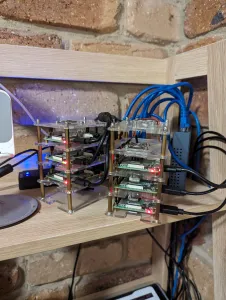
Layer 2 – Data Link
I’ve intentionally not introduced much in the way of security on the data link layer beyond ensuring that the layer 2 network (all the equipment located behind my firewall/router) is dedicated to the platform, no other devices should be present on this network, all other access is via the router.
It is worth noting that Cilium – the network stack chosen for the cluster does provide some layer 2 functionality as part of its load balancing feature.
Layer 3 – Network
At this point we need to start being much more careful and applying more rigor. I have a dedicaed IP range that holds the inner workings of the cluster, monitoring and management. Outbound and related traffic is currently permitted, but inbound is not (with some exceptions outlined in higher layers).
This area should be logged/monitored and regularly reviewed.
The router itself should have access extremely limited and all default passwords/secrets changed or reset.
In a more robust setup it would be prudent to segment the network itself to allow for further restrictions, but for a small dev lab at home this will suffice.
Layer 4 – Transport
The cluster will leverage both TCP and UDP connections – TCP is the defacto standard for most protocols but with the introduction of higher order protocols such as WebRTC, GRPC and HTTP/3 UDP is more likely to be in active use.
Upper Layers – 5 to 7
These will depend heavily on the services I deploy internally and externally:
Internal
These applications/services should not be accessible to anyone outside the cluster.
Ideally access should also be restricted for nodes that do not require access, but as discussed in Layer 2, this is overkill for a home lab.
- Kubernetes admin – this should be secured and access should be limited. More on this below.
- NFS v3 – between Kubernetes worker nodes and my NAS – allowing for dynamic volumes as required. NFS is not considered a secure protocol on its own, so I’m relying on the inherent physical and network limitations to contain/mitigate risk here.
- Cilium – the networking, load balancing and inspection tool provides inter-node communication and is also leveraged on the kubernetes admin pane to provide inspection and insight – Note: One exception to this internal-only access will be the Gateway API.
- K8s-manager – my general all-purpose host for monitoring and ansible.
- SSH connectivity to master and worker nodes.
- Router administration
- NAS administration
- Cert-Manager – a kubernetes service responsible for provisioning and renewal of certificates leveraging Lets-Encrypt and Cilium’s Gateway API.
External
- A single kubernetes Gateway API provided by Cilium with the following HTTPRoutes:
- A generic redirector on HTTP that redirects to HTTPS HTTPS host listening on wiki.jhbutler.info – which passes through to the internal wikijs host.
- A HTTP listener leveraged by Cert-Manager to provide A-record validation for new certificates.
- Router ports 80 and 443 – responsible for forwarding to the API gateway.
Other considerations
Use of external tools and use of externally developed software on the platform is always a risk – Each tool deployed should be considered carefully in terms of reputation and potential risk to the overall cluster.
Software and services
For core services I’ve opted to use systems and platforms with broad adoption across Cloud services on both Enterprise and Open Source solutions.
Containers
Containers need to be treated with a bit more care than first glance. Containers are built on dependencies just like software, so risk can not only come from the container owner, but from the underlying image that container builds on, or the one under that… and so on. For my purposes reputation and ensuring non-root access for most containers will be key, but for a more production oriented platform, building your own containers from a common core would be prudent.
For now I believe an item on my todo list will be to ensure I add container scanning to the platform – some potential options to investigate include Clair and Docker Bench Security
Code Repos
My code is in github – one of the key security concerns here is ensuring that secrets and semi-secret material that might help someone determine an appropriate attack vector to my platform are not in the codebase or its history.
Some material may be safe to store in secured repositories or in github variables for github actions, but ideally these should all be stored in a separate secrets vault.
Secrets
There’s a ton of sensitive data that needs to be secured:
- SSH keys – both my own and the dedicated keys for ansible
- Router credentials
- The master credentials for kubectl
- SSH keys for github
- Application specific secrets
- Mariadb
- Wikijs
- Whatever else I chose to deploy
All of this stuff shouldn’t be left lying around on workstations. Its very convenient to me when it’s readily available but every copy exposes the platform to more risk. That in and of itself needs a dedicated article though, so I’ll be moving on to that shortly.
Summing it all up
So that leaves me with a broad set of responsiblities to
- Harden
- Refresh and keep updated
- Monitor
- … and ensure that secrets are not more accessible than they should be.
As a one-person act, this is a fair bit to take on, so I’m definitely going to need to ensure some good automation is present across all of these activities.