Secrets Management with Doppler
After settling on Doppler as my secrets solution of choice I’ve set about to learn about the platform and how best to implement this in a relatively secure manner for my platform.
Doppler secrets are grouped as projects and environments. As I have one environment right now and it truly is ‘dev’ I’m going to stick to that environment alone.
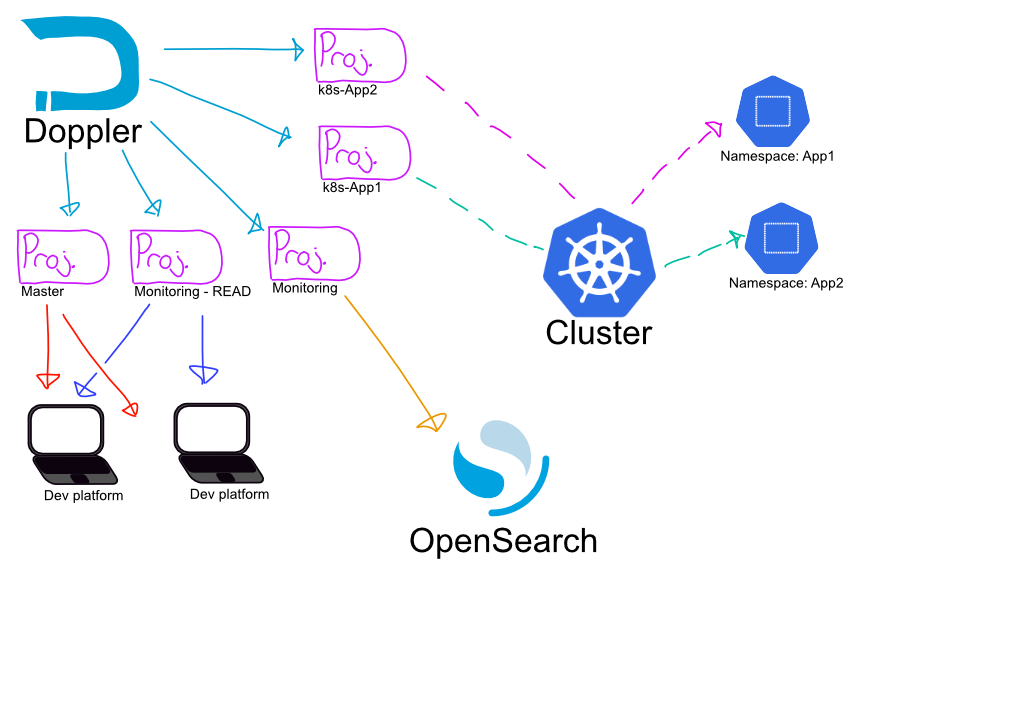
I’ve opted to split the projects logically as follows:
Projects
- A main project for core administrative secrets
- Kubectl admin access
- SSH keys for access to each system
- A Monitoring project containing admin and platform secrets for Opensearch
- A Monitoring “read” project containing user secrets allowing login to opensearch for inspection.
- And then each discrete application internal to Kubernetes should have its own dedicated project.
For now I’ve focused on the deployment of the admin settings, as right now the .kube/config file is spread across several workstations and I’d like to severely limit access.
Encapsulating Kubeconfig with Doppler
Doppler is built to wrap around the execution of a service, command or process. For user based interactions this involves:
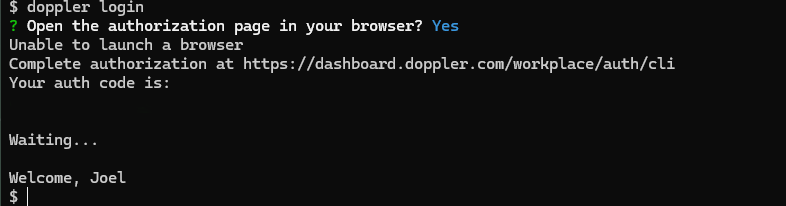
- A login to doppler.
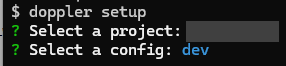
- A setup command specifying the project, environment and potentially folder based scope.
- Then an invocation of doppler as a wrapper around your command.

As I’ve removed all reference to the config file on this system, without the help of the secrets manager running kubeconfig fails as the defaults don’t point anywhere useful (I don’t run kube-admin on my WSL host on my workstation). 
What is Going on Under the Hood?
What we’re doing here is pre-configuring Doppler with what it has access to, and then when we invoke our command – in this case kubectl, we are injecting the file containing the keys, config and credentials (typically stored as ~/.kube/config) as a temporary object that is readable only by this process. The template file defines exactly what secret is read out, and how it is formatted. In this case we want the entire contents of a single secret represented as a file:
$ cat ./doppler/templates/kube-config.tmpl
{{.MY_KUBECONFIG_SECRET_NAME}}
When kubectl exits, the file is removed as part of doppler exiting which helps minimize the potential for credential exposure.
When I’m done working for the day I can revoke these credentials using doppler logout, which removes all potential access to the system until I log back in again using the UI. Tokens can also be revoked by the web UI, and it’s generally a good idea to prune these if you are not actively logged in.
Service Authentication
That’s all well and good for user authentication but how about for automation? Doppler uses a similar config for automation but instead of using the CLI login process, instead we generate a token which provides read only access to a particular Project and Environment.
When setting these up we can pass them to doppler as a command (taking care to clear any bash history or log data to ensure this is kept safe):
doppler configure set token --scope /path/to/my_appDoppler will then persist this data (through system reboots) making the secrets available on request. Tokens can be revoked via the Webui.
Auditing access
Doppler provides logs at both project and secret level to track changes and access. The free developer version is limited to a few days which is understandable. The below image shows the time and date I accessed the secret to log into kubectl via the CLI.

Summing up
Doppler provides a solution that meets most of the requirements I outlined in my article on secrets management.
- It provides a user and system convenient method for secret retrieval*
- It provides audit controls to review what was accessed and changed and when.
- The keys are securely stored behind both identity and authorization management mechanisms, or to put this more plainly: The system validates who I am, and what I’m allowed to see.
- As an enterprise SaaS platform we’re going to assume the backup and replication elements are managed by the vendor. **
A few footnotes:
* Regarding usability – There are some limitations to doppler, which I’ll explore in a later post. For now I believe these limitations are manageable and the benefits are clear.
** Regarding backup and recover on SaaS On any SaaS platform it is crucial to understand where responsibility lies… For example if I delete a secret, that’s probably on me, but if a system failure causes a loss of data that is most likely on the vendor. I would also strongly advise having a disaster recovery plan that covers complete loss of credentials in this service, such as having break-glass backup accounts stored securely elsewhere for emergency retrieval.