Early Physical setup and Some Ansible
As part of setting up everything I wanted to try and automate some of the initial setup of the platform. There’s not a huge volume of setup involved, but there is a lot of repeatable steps run across all of the worker nodes in a kubernetes cluster.
My setup typically involves:
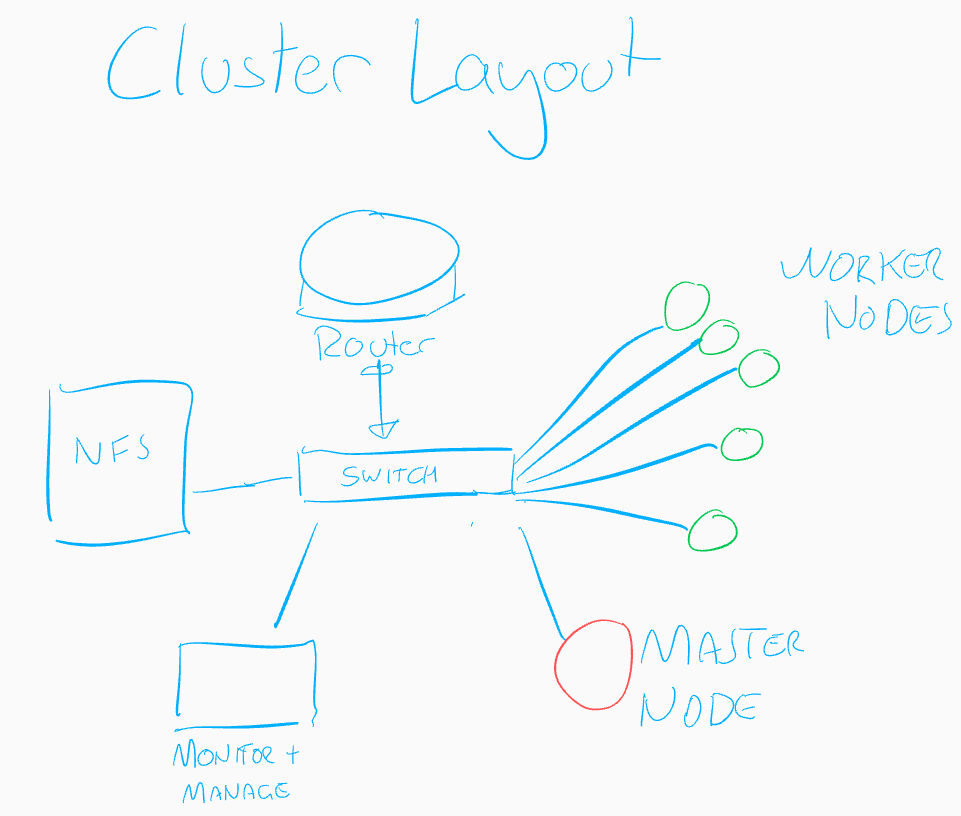
- A router/firewall at the edge
- A gigabit switch that handles the layer 2 connections between all the devices.
- 5 worker nodes running Ubuntu on ARM (raspberry PI units).
- A master node that I allow to perform some workload (although I may avoid that this time around).
- An NFS host that provides storage for deployments that require volumes (more on this later once the cluster is live)
- And finally a system that sits outside of the cluster providing some supporting services, such as logging and monitoring.
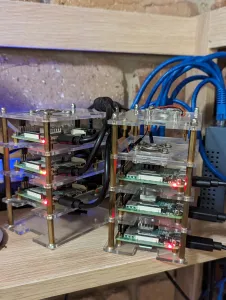
Setting up the NFS and Monitoring systems are more manual, but the worker and master nodes often require the most attention and occasional rebuild, so it is there I’ve opted to spend a bit of time with Ansible.
Automation in an enterprise setting can be a very powerful tool, but one of the key things that is critical to any automated process is that someone should know what the automation does, and ideally how to replicate that manually. When things inevitably go wrong being able to describe what was meant to happen is a great first step in troubleshooting.
This is often the role of Devops and or SRE resources, but in my home lab, it’s all me.
What to Automate
While the temptation is to automate ‘everything’, and I’m all for an infrastructure-as-code approach wherever possible, this is a bare metal setup intended for learning and experimentation – so the things I’m going to chose to automate here will either benefit my own learning, save me time, or may simply be something of interest.
In order of priority I’ve determined the following as starting points:
- Worker and Master node initialization.
- /etc/hosts management.
- Custom Package source management (containerd.io, kubernetes)
- Prerequisites installation.
- Kubernetes and Containerd pre-configuration.
- Having never managed to get around to leveraging Ansible for deployments I thought this would be a great opportunity to do so. I’m quite clear on what I need to do, and how I can test that this has been done successfully so I’ve built out a playbook that leverages most of the basic steps outlined in Pradeep Kumar’s guide to installing kubernetes on Ubuntu and adds a few customisations of my own to help move things along.
For the Ansible host I’ve opted to use my monitoring platform for now, but may transition this to one of my development systems outside of the cluster.
As it stands the ansible playbooks need some additional work to segment out the items that are not secrets but are items I’d prefer not to make publically available, so I’ll aim to share these on github at a later date.
A quick note on security
My environment is an experimental dev platform, but even in this space there should be some basic rules and controls we should have in place to ensure security and control.
Designing with security in mind from the get-go can save a lot of pain and angst later on. For this home project I have significantly limited resources and funds but there are still some basics I’d like to ensure are in place.
- Nothing should be exposed to the wider world at this point, and when I do chose to do this, we should have very clear controls over what and how. The firewall/router will be key here.
- I should limit what gets to play ‘inside’ this network, particularly adjacent to the cluster and to the NFS host.
- Password based authentication should be disabled for all nodes, authentication via keypairs should be used instead.
- User private keys should be password encrypted.
- Automation should run as a separate user for ease of logging/reporting. 6/ Logging, monitoring and a secrets vault should be a priority – more on this later.
- If possible the cluster should leverage a mesh network permitting only valid inbound/outbound traffic for each service.
What is next
I’ll be aiming to get the basic nuts and bolts of the cluster back up and running, and then as time permits I hope to introduce some monitoring with OpenSearch and then ensuring Kubernetes secrets encryption at rest is in place.